We've all done it. A contractor needs access to the staging database. You open Slack, type the password, hit send. Maybe you add "delete this after" — as if that means anything.
I ran into this problem on my own team. We needed to send tokens, API keys, and database credentials to contractors. Regularly. And every time, the same awkward dance: a Slack DM, an email, or — worst case — a shared Google Doc called "Credentials (DO NOT SHARE)."
One day I searched our Slack history for "password" and found credentials from six months ago sitting in plaintext. Anyone with workspace access could read them. That was the moment I decided to build something.
The Problem Nobody Talks About
If your team uses a password manager like Bitwarden or 1Password, you're covered internally. You share a vault, everyone has access, life is good.
But what about the contractor who's not in your password manager? The client's developer who needs an API key for a week? The new hire on day one, before they even have Bitwarden set up?
That's the gap. The last mile of credential sharing where your password manager can't reach.
Most teams solve it with:
- Slack DMs — searchable, persistent, visible to workspace admins
- Email — forwarded, backed up, sitting in inboxes forever
- Shared docs — no expiry, no access control, no audit trail
- SMS — unencrypted, stored by carriers
All of these leave secrets lying around long after they're needed.
What I Wanted
Simple requirements:
- Encrypt in the browser — the server should never see the plaintext
- One-time read — link works once, then the data is gone forever
- No signup — the recipient shouldn't need an account
- Self-hostable — I want to control where my secrets live
- CLI support — because I live in the terminal
I looked at existing tools. OneTimeSecret has been around forever, but its encryption happens server-side — the server sees your plaintext before encrypting it. Privnote works but there's no self-hosting option and the security model is opaque. Yopass is solid but lacks a CLI and built-in generators.
So I built 1time.io.
How It Works
The core idea is zero-knowledge encryption. The server never sees your secret.
Here's the flow
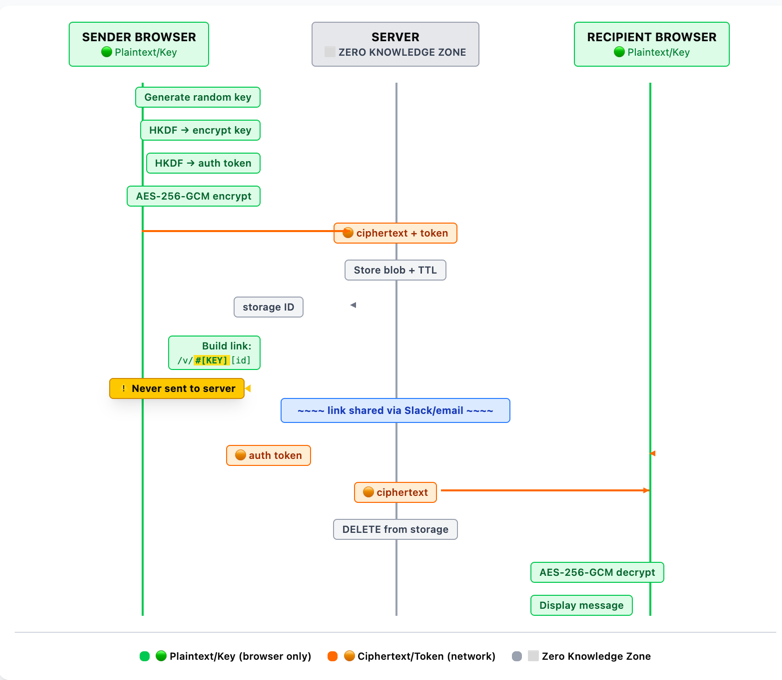
When you create a secret
- Your browser generates a random 20-character key
- The key is fed through HKDF-SHA256 to derive two things: an encryption key and an auth token
- Your message is encrypted with AES-256-GCM using the derived key
- The browser sends the encrypted blob + auth token to the server
- The server stores it and returns a storage ID
- Your browser builds the link:
https://1time.io/v/#[key][storageId]
The critical part: the decryption key lives in the URL fragment (the part after #). URL fragments are never sent to the server. Not in the HTTP request, not in server logs, not anywhere. The server only ever sees ciphertext.
When the recipient opens the link
- Their browser extracts the key from the URL fragment
- Derives the same auth token using HKDF
- Requests the encrypted message from the server (using the auth token)
- Server returns the ciphertext and deletes it permanently
- Browser decrypts locally and displays the message
After step 4, the data is gone from the server. Even if someone gets the link later, there's nothing to retrieve.
- Encrypted blob
- Hashed auth token
- Expiry timer (TTL)
- Request timestamp
- IP address (14d logs)
- Your message
- Encryption key
- URL fragment (#)
- Who reads it
- What it says
This is what "zero-knowledge" actually means. Not a marketing term — a verifiable architectural property. You can read the source code and verify it yourself.
The Tech Stack
I built this solo. The whole thing is deliberately minimal:
- Backend: Go standard library. No frameworks, no ORM. About 1,000 lines of code handling three API endpoints.
- Storage: Redis with TTL-based auto-expiry. Secrets expire even if nobody reads them (1 to 30 days, your choice).
- Frontend: Next.js, statically exported. Encryption happens via the Web Crypto API — the same primitives your browser uses for HTTPS.
- CLI: Node.js, published as
@1time/clion npm.
No third-party analytics. No cookies. No tracking scripts. The privacy policy is short because there's nothing to disclose.
Self-Host It in 2 Minutes
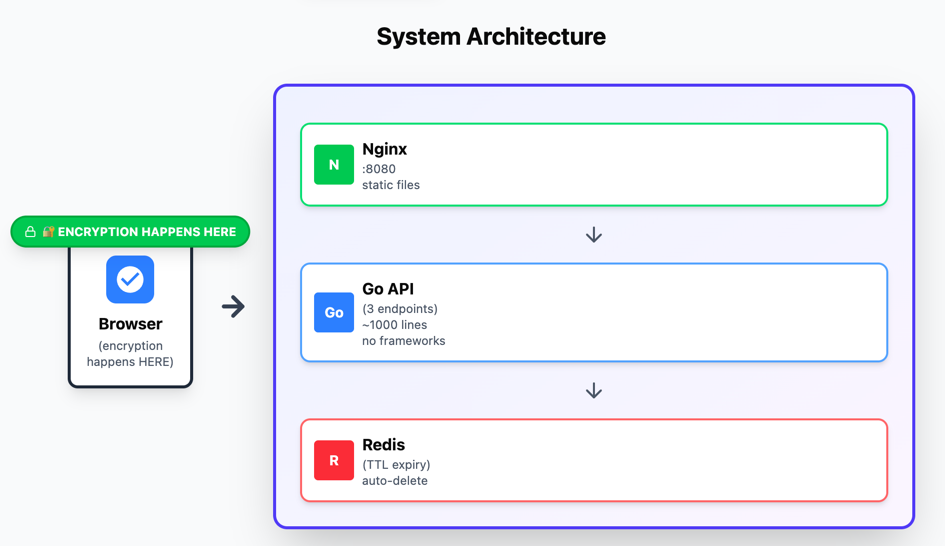
The whole thing runs as three Docker containers: Nginx (static frontend), Go API (three endpoints), and Redis (TTL expiry). Pre-built images for amd64 and arm64.
curl -O https://raw.githubusercontent.com/shingrus/1time/master/docker-compose.yml
curl -O https://raw.githubusercontent.com/shingrus/1time/master/.env.example
cp .env.example .env
# Set APP_HOSTNAME to your domain
docker compose up -d
The .env file has four variables:
DATA_DIR=./data
APP_HOSTNAME=your-domain.com
APP_PORT=8080
SHOW_BLOG=false
Your secrets, your server, your rules.
Use It from the Terminal
If you're like me and prefer not to leave the terminal:
npm install -g @1time/cliPipe a secret directly:
printf 'sk_live_abc123' | 1time send
# → https://1time.io/v/#aBcDeFgHiJkLmNoPqRsT...
Read a secret:
1time read 'https://1time.io/v/#aBcDeFgHiJkLmNoPqRsT...'
# → sk_live_abc123
Point it at your self-hosted instance:
1TIME_SECRET="$DB_PASSWORD" 1time send --host your-domain.comCheck out the full CLI guide for more examples.
What It's Not
Let me be honest about what 1time.io doesn't replace:
- It's not a password manager. Use Bitwarden, 1Password, or KeePass for storing and sharing credentials within your team.
- It's not a secrets manager. Use Vault, AWS Secrets Manager, or Doppler for application secrets in your infrastructure.
- It's not for recurring access. If someone needs a credential repeatedly, give them proper access.
1time.io solves one specific problem: sending a secret to someone one time, securely, without leaving a trace.
The contractor who needs the staging DB password. The client's developer who needs your API key. The new hire who needs the WiFi password before their accounts are set up.
Try It
The hosted version is free at 1time.io — no signup, no tracking, no limits.
The source code is on GitHub — MIT licensed, ~1,000 lines of Go, zero-dependency backend.
If you have questions about the crypto implementation, the code is open — read it, audit it, break it. That's the point of open source.
Share a secret without leaving a trace
Create an encrypted one-time link. It takes 10 seconds and self-destructs after one read.
Create a secure link